Overview
This guide explains how to deploy and manage Google Cloud Managed Instance Groups (MIGs) using Harness.
Currently, this feature is behind the feature flag CDS_GOOGLE_MIG. Contact Harness Support to enable the feature.
Overview
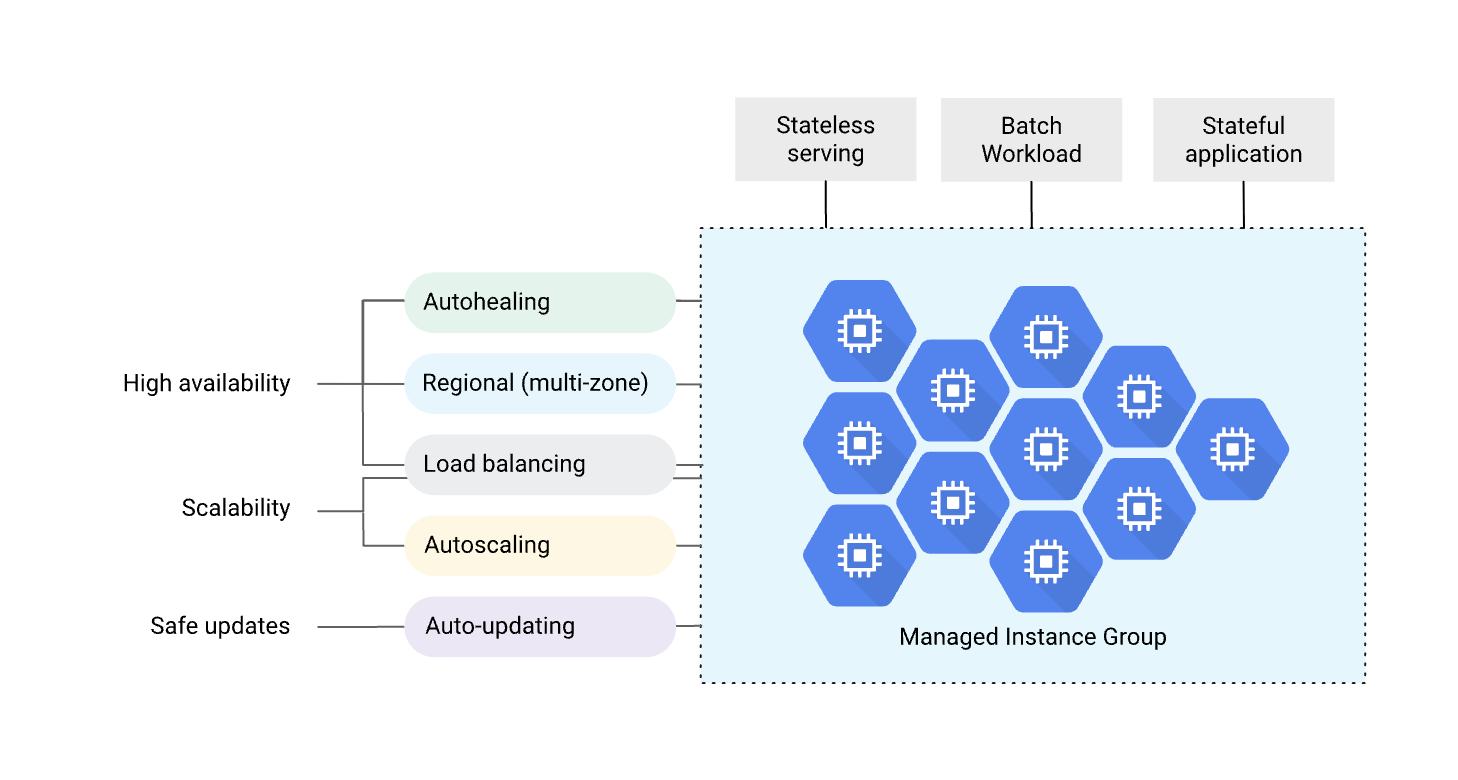
Harness supports deploying and managing Google Cloud Managed Instance Groups (MIGs) with automated scaling, health checks, and zero-downtime deployments. A MIG is a group of identical VM instances that you can manage as a single entity, providing high availability, load balancing, and automatic recovery capabilities. This unified management approach simplifies operations while ensuring your applications remain resilient and scalable.
MIGs are ideal for stateless serving workloads, batch processing, stateful applications, and any application that requires horizontal scaling. With Harness, you can leverage advanced deployment strategies, such as Blue-Green deployments, to ensure safe, controlled rollouts with instant rollback. The platform handles all the complexity of managing instance templates, coordinating updates, and shifting traffic between environments.
Why use Harness for MIG deployments?
Deploying MIGs with Harness transforms how you manage GCP compute workloads by providing enterprise-grade deployment orchestration. Instead of manually managing instance templates, backend services, and traffic routing in the GCP console or via CLI commands, Harness automates the entire deployment lifecycle. This automation reduces deployment time, eliminates human error, and provides consistent, repeatable deployments across all your environments.
Harness brings several key advantages to MIG deployments. The platform enables zero-downtime deployments by using Blue-Green strategies integrated with Cloud Service Mesh, ensuring your users never experience service interruptions during updates. When issues arise, automated rollback capabilities let you instantly revert to previous versions without manual intervention or complex recovery procedures.
The gradual traffic-shifting feature lets you validate new versions under real production load before a full rollout. You can shift traffic incrementally—starting with 10%, then 50%, and finally 100%—monitoring application metrics at each stage to catch issues early. This progressive delivery approach significantly reduces the risk of widespread failures while maintaining complete control over your deployment process.
All MIG configurations are defined declaratively as JSON manifests, enabling infrastructure-as-code practices. Your instance templates, autoscaling policies, and health checks live in version control, providing complete audit trails and enabling easy rollbacks to known-good configurations. Harness also supports cross-project deployments, allowing you to manage MIGs across multiple GCP projects with a single connector and OIDC authentication.
Key capabilities
Deployment strategies
Harness currently supports Blue-Green deployment strategy for MIGs, which maintains two identical environments that alternate roles with each deployment. One environment serves as your stable production environment handling live traffic, while the other acts as a stage environment where you deploy and validate new versions. This separation ensures that you thoroughly test and prepare new versions before they receive any production traffic.
The Blue-Green approach uses Cloud Service Mesh with HTTPRoute or GRPCRoute resources to control traffic distribution between environments. Harness automatically manages both environments, creating and labeling them as stable and stage. After each successful deployment, the environments swap roles—what was stable becomes stage, and what was stage becomes the new stable environment. This pattern aligns with how Harness implements Blue-Green deployments in Kubernetes, providing a consistent deployment experience across different cloud platforms.
MIG infrastructure components
MIG deployments rely on several GCP resources that you configure and maintain. Understanding these components helps you set up your infrastructure correctly before deploying with Harness.
Instance templates define your VM configuration, including machine type, boot disk, network interfaces, startup scripts, metadata, and labels. These templates act as blueprints for every instance in your MIG, ensuring consistency across your entire deployment. You create and manage these templates in GCP.
MIG configuration controls operational aspects like distribution policy across zones, update policy for rolling changes, and constraints like maxSurge and maxUnavailable that govern update speed. For details, see Creating managed instance groups in GCP documentation.
Autoscaling (optional) adjusts instance count based on CPU utilization, load balancer capacity, or custom Cloud Monitoring metrics. See Autoscaling groups of instances for configuration options.
Health checks monitor instance health and trigger automatic replacement of unhealthy instances, ensuring your application maintains high availability. See Health checks overview for setup guidance.
Cloud Service Mesh integration
For advanced traffic management, Harness integrates deeply with Google Cloud Service Mesh to provide fine-grained control over request routing. Cloud Service Mesh uses route resources—HTTPRoute for HTTP/HTTPS traffic and GRPCRoute for gRPC services—to define how requests flow through your infrastructure. These routes support sophisticated matching based on paths, headers, and query parameters, giving you robust control over traffic distribution.
The integration enables weighted traffic distribution, allowing you to shift traffic between stable and stage environments during deployments gradually. You can start by sending just 10% of traffic to validate the new version, then progressively increase to 50% and finally 100% as confidence grows. This approach works seamlessly for service-to-service (east-west) traffic within your microservices architecture, making it ideal for complex distributed systems.
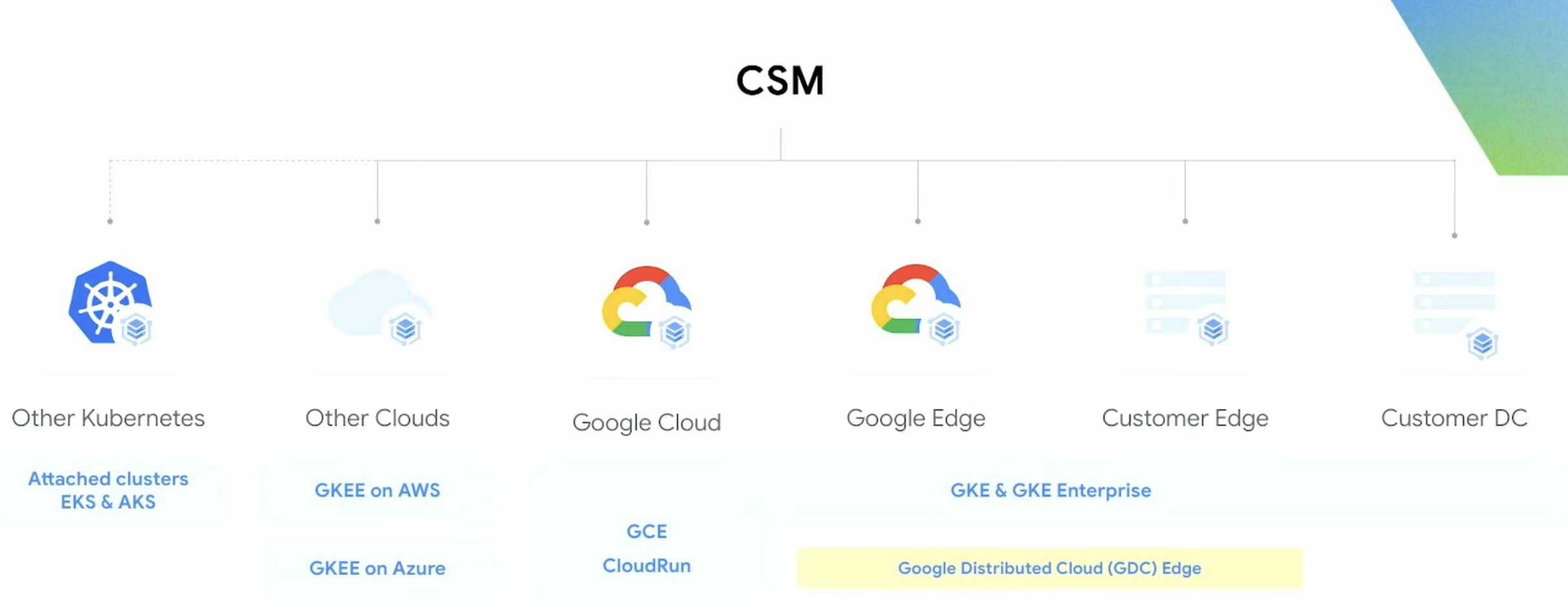
Cloud Service Mesh in Harness MIG deployments supports multiple deployment environments. Whether you're running workloads on GKE, Compute Engine, or hybrid/multi-cloud setups, the same traffic management capabilities apply. This flexibility allows you to adopt consistent deployment practices across your entire infrastructure, regardless of where your services run.
Authentication options
Harness supports multiple GCP authentication methods, giving you flexibility in how you connect to your cloud resources. Google OIDC (OpenID Connect) provides secure, keyless authentication using workload identity federation, eliminating the need to manage and rotate service account keys. We recommend this approach for production environments as it reduces security risks and simplifies credential management.
Alternatively, you can use traditional Service Account authentication with JSON key files. This method works well for getting started quickly or when OIDC isn't available in your environment. Both authentication methods support cross-project access, allowing a single connector to deploy MIGs across multiple GCP projects—a significant advantage for organizations managing complex, multi-project infrastructures.
MIG deployment types
Google Cloud offers two types of Managed Instance Groups, each suited for different availability and performance requirements.
Regional MIGs
Regional MIGs deploy instances across multiple zones within a region, providing the highest level of availability and resilience. When you create a regional MIG, GCP automatically distributes your instances evenly across available zones in the specified region. This distribution protects your application from zone-level failures—if an entire zone goes offline, your instances in other zones continue serving traffic without interruption.
We strongly recommend regional MIGs for production workloads where high availability is critical. The multi-zone distribution not only protects against failures but also improves application latency by placing instances closer to users across different geographic areas within the region. While regional MIGs may have slightly higher networking costs due to cross-zone traffic, the reliability benefits far outweigh this consideration for most production applications.
Zonal MIGs
Zonal MIGs deploy all instances within a single zone, providing simpler management and potentially lower networking costs. Since all instances reside in the same zone, network latency between instances is minimized, which can benefit applications requiring frequent inter-instance communication. Networking costs are also lower as traffic stays within a single zone.
Zonal MIGs work well for development, testing, and non-critical workloads where the risk of zone failure is acceptable. They're also suitable for batch processing jobs that can be restarted if a zone fails. However, keep in mind that a zone outage will affect all instances in a zonal MIG, potentially causing complete service disruption.
Benefits of using MIGs
Managed Instance Groups provide powerful operational capabilities that simplify infrastructure management while improving application reliability. The primary benefit is high availability through automatic instance recreation. When an instance becomes unhealthy or is accidentally deleted, the MIG automatically creates a replacement instance using the configured template. This self-healing capability ensures your application maintains its target capacity without manual intervention.
Horizontal scaling is another core advantage. MIGs support autoscaling based on various metrics including CPU utilization, load balancer serving capacity, or custom Cloud Monitoring metrics. As demand increases, the MIG automatically adds instances to handle the load. When demand decreases, it scales down to optimize costs. This dynamic scaling ensures you're always running the right number of instances for current conditions.
Load balancing integrates seamlessly with MIGs through GCP load balancers and Cloud Service Mesh. Traffic is automatically distributed across all healthy instances in your MIG, providing consistent performance and eliminating single points of failure. The autohealing feature works in tandem with health checks—instances that fail health checks are automatically replaced, ensuring traffic only reaches healthy instances.
MIGs also provide controlled update mechanisms through their native update policies. When you update an instance template, you can control how quickly the changes roll out using maxSurge and maxUnavailable settings. This granular control prevents overwhelming your infrastructure with simultaneous updates while ensuring changes deploy in a reasonable timeframe. For regional MIGs, GCP distributes instances across zones automatically, providing zone-level resilience without requiring manual zone management.
Prerequisites
Before deploying MIGs with Harness, ensure you have the following:
- Harness Account: Active account with the Continuous Delivery module enabled
- GCP Project: An active GCP project with appropriate permissions
- GCP Connector: A Harness connector to GCP using OIDC or Service Account authentication
- IAM Permissions: Service account with permissions to manage MIGs, backend services, and optionally Cloud Service Mesh resources
- Cloud Service Mesh (optional): Enabled for Blue-Green deployments with advanced traffic management using HTTPRoute or GRPCRoute resources
- Compute Engine Images: GCP Compute Engine images for your instances, stored in a format accessible to your MIG deployments
For detailed IAM permission requirements, see the GCP IAM requirements section below.
GCP IAM requirements
MIG Deployment Minimum Permissions
The following are the minimum set of permissions required for deploying and managing MIGs:
Compute Engine Permissions
-
Instance Template Management:
compute.instanceTemplates.createcompute.instanceTemplates.getcompute.instanceTemplates.listcompute.instanceTemplates.delete
-
Instance Group Management:
compute.instanceGroupManagers.createcompute.instanceGroupManagers.getcompute.instanceGroupManagers.listcompute.instanceGroupManagers.updatecompute.instanceGroupManagers.delete
-
Instance Management:
compute.instances.getcompute.instances.list
-
Autoscaler Management (if using autoscaling):
compute.autoscalers.createcompute.autoscalers.getcompute.autoscalers.updatecompute.autoscalers.delete
-
Health Check Management (if using health checks):
compute.healthChecks.createcompute.healthChecks.getcompute.healthChecks.updatecompute.healthChecks.delete
Backend Service Permissions (for Blue-Green)
- Backend Service Management:
compute.backendServices.createcompute.backendServices.getcompute.backendServices.listcompute.backendServices.updatecompute.backendServices.delete
Cloud Service Mesh Permissions (if using CSM)
-
HTTPRoute/GRPCRoute Management:
networkservices.httpRoutes.getnetworkservices.httpRoutes.updatenetworkservices.grpcRoutes.getnetworkservices.grpcRoutes.update
-
Mesh Management:
networkservices.meshes.getnetworkservices.meshes.list
IAM Permissions
-
Service Account Usage:
iam.serviceAccounts.actAsiam.serviceAccounts.get
-
Authentication Using OIDC:
iam.workloadIdentityPools.createCredentialConfig
-
Authentication Using Service Account Key:
iam.serviceAccounts.signBlob
Predefined Roles
Alternatively, you can use the following predefined roles:
-
Compute Instance Admin (v1) (
roles/compute.instanceAdmin.v1):- Grants permissions to create and manage instance groups, instance templates, and instances
-
Compute Load Balancer Admin (
roles/compute.loadBalancerAdmin):- Grants permissions to manage backend services, forwarding rules, and load balancing components
-
Network Services Admin (
roles/networkservices.admin):- Grants permissions to manage Cloud Service Mesh resources (HTTPRoutes, GRPCRoutes, Meshes)
-
Service Account User (
roles/iam.serviceAccountUser):- Required to use service accounts for instance creation
-
IAM Workload Identity Pool Admin (
roles/iam.workloadIdentityPoolAdmin):- Required for OIDC-based authentication
Custom Role Example
You can create a custom role with the minimum required permissions:
{
  "title": "Harness MIG Deployment Role",
  "description": "Custom role for Harness MIG deployments",
  "stage": "GA",
  "includedPermissions": [
    "compute.instanceTemplates.create",
    "compute.instanceTemplates.get",
    "compute.instanceTemplates.list",
    "compute.instanceTemplates.delete",
    "compute.instanceGroupManagers.create",
    "compute.instanceGroupManagers.get",
    "compute.instanceGroupManagers.list",
    "compute.instanceGroupManagers.update",
    "compute.instanceGroupManagers.delete",
    "compute.instances.get",
    "compute.instances.list",
    "compute.backendServices.create",
    "compute.backendServices.get",
    "compute.backendServices.list",
    "compute.backendServices.update",
    "compute.backendServices.delete",
    "networkservices.httpRoutes.get",
    "networkservices.httpRoutes.update",
    "networkservices.grpcRoutes.get",
    "networkservices.grpcRoutes.update",
    "iam.serviceAccounts.actAs",
    "iam.serviceAccounts.get"
  ]
}
Limitations
Harness currently provides orchestration for Blue-Green deployment strategies. For GCP-native deployment approaches like rolling updates and canary deployments, you can configure these directly through your MIG update policy in GCP.
Next steps
To get started with MIG deployments in Harness:
- Configure Service and Environment - Set up your service definition with instance templates, MIG configuration, and artifacts
- Blue-Green Deployment Strategy - Learn how to implement Blue-Green deployments with Cloud Service Mesh