Harness DB DevOps Overview
Harness Database DevOps helps customers integrate database changes seamlessly into their application deployment pipelines. It provides a centralized way to manage database schemas and enforce governance policies - all while enabling developers and DBAs to collaborate more effectively on database changes.
Harness Database DevOps bridges the gap between application delivery and database management, empowering customers to ship software faster and more reliably.
Harness DB DevOps provides a way to:
- Facilitate scalability: Automating provisioning and configuration management allow databases to scale efficiently in response to increasing loads, ensuring optimal performance and availability.
- Improve collaboration and efficiency: Integrating databases changes into the DevOps pipeline, team can collaborate more effectively. This helps reduces silos and improve communication, leading to more efficient workflows helping to identify and resolved issues faster.
- Increase reliability and stability: The automation of testing and deployment processes ensures that changes are consistent and less prone to human error.
- Streamline Change Management: Managing database schema changes becomes more efficient with version control and automated deployments.
- Enhanced Security and Compliance: Automated processes ensure that security policies are consistently applied across all environments, and compliance checks can be integrated into the CI/CD pipeline.
- Orchestration of Database Changes: Harness Database DevOps allows for the orchestration of database changes in a manner similar to application code deployments. This means that database changes can be managed through pipelines, ensuring that they are executed in a controlled and automated way. This orchestration helps to eliminate the manual processes that often slow down deployments when database changes are involved.
Harness DB DevOps Architecture
Before you can access Harness Database DevOps, you must have Harness enable the following feature flag, DBOPS_ENABLED. To enable the feature flag, please contact Harness Support.
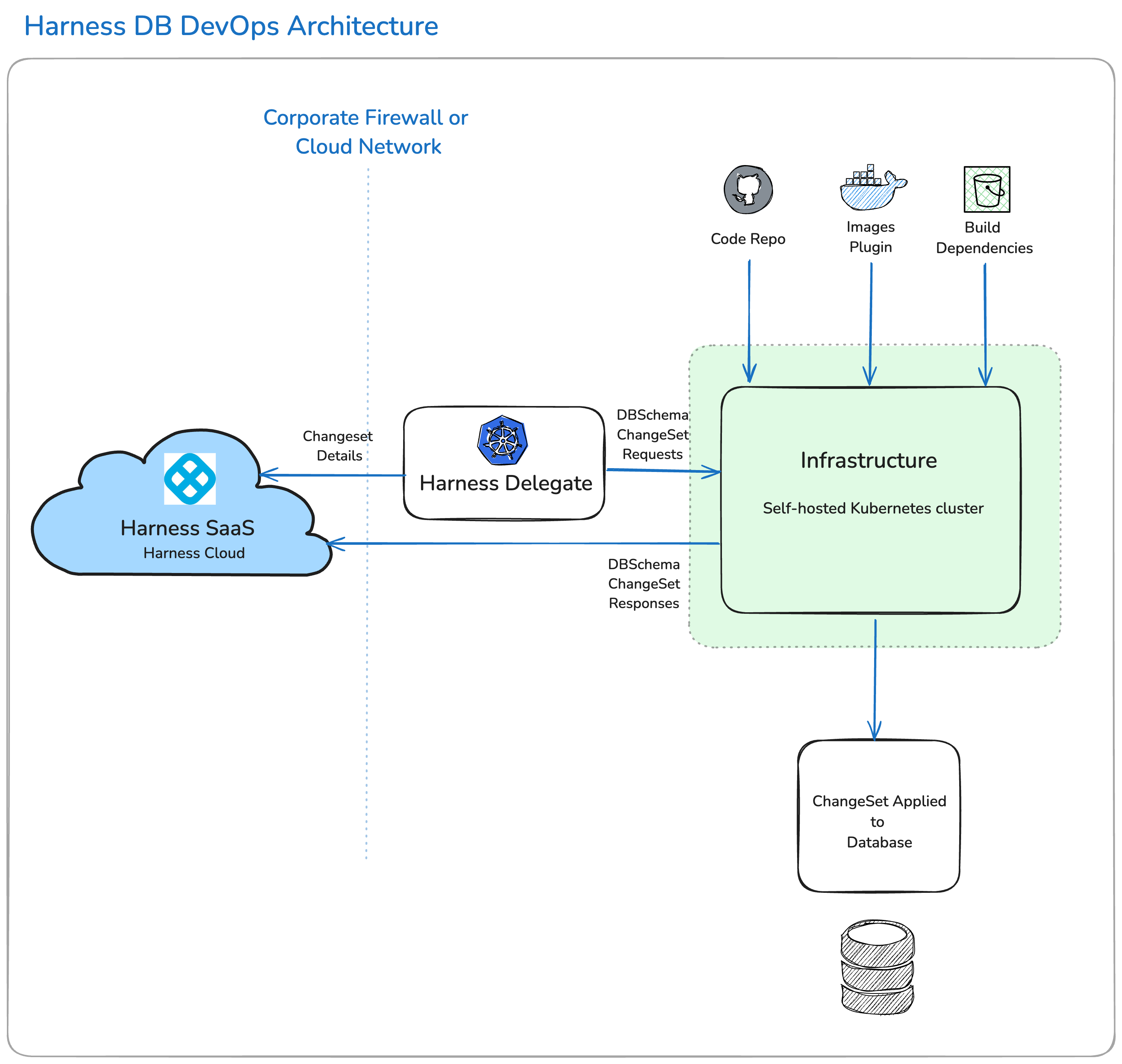
Harness now streams large, transient, runtime-only payloads (such as logs, test results, and database schema diffs) directly from short-lived plugin pods to the SaaS platform over outbound TLS. This enhancement avoids Delegate resource bottlenecks and improves scalability. All secrets and sensitive data continue to remain strictly within customer infrastructure, with the Delegate enforcing all orchestration and authentication.
The Harness Database DevOps architecture is built around the Harness Delegate, which plays a crucial role in managing database change operations. This delegate operates within your environment—whether that's a local network, virtual private cloud, or Kubernetes cluster—ensuring seamless integration with your existing infrastructure.
The Harness Delegate serves as the bridge between the Harness Manager in your SaaS instance and your database instances, code repositories, and cloud providers. It facilitates the orchestration of database changes by connecting to your version control systems and artifact repositories, allowing for efficient management of database migrations and updates.
You have the flexibility to store your database scripts and artifacts either internally or on public platforms like GitHub. The delegate is responsible for spinning up pods on a Kubernetes cluster to executing database change jobs and applying migrations as specified in your deployment pipelines. This Kubernetes cluster must have network access to your databases, and the delegate must have access to the cluster. By leveraging the harness delegate neither the database server, nor the Kubernetes cluster, needs to be internet accessible. It also collects and transmits data back to the Harness Manager, which can be utilized for orchestration, monitoring, debugging, and analytics.
Upon successful completion of a database deployment pipeline, the system can apply changes to the designated database instances, based on your pipeline configuration. Harness Database DevOps captures detailed logs and outputs from each deployment, enabling you to review and analyze the results both during and after the execution of your database operations.
This comprehensive approach ensures that your database changes are managed efficiently and effectively, aligning with best practices in Database DevOps.
Harness DB DevOps Images List
Harness publishes plugins/drone-liquibase with x.y.z-{liquibaseVersion}, where x.y.z follows Harness semantic versioning.
Here are some examples of Harness DB Devops images and their purposes:
plugins/download-artifactory: Used for downloading artifacts from Artifactory.plugins/drone-liquibase:x.y.z-{liquibaseVersion}: Default Liquibase plugin for database operations.harness/drone-git: Used to clone Git repositories.plugins/drone-liquibase:x.y.z-{liquibaseVersion}-mongo: Liquibase plugin for MongoDB.plugins/drone-liquibase:x.y.z-{liquibaseVersion}-spanner: Liquibase plugin for Google Spanner.
For complete and latest list of images and their tags, refer to the Release Notes.
Configure Harness DB Devops Image Versions
By default, Harness uses predefined images. Customers can override these defaults using API endpoints.
Get Default Configurations
Retrieve the latest default Harness DB Devops image versions:
curl -i -X GET \
https://app.harness.io/v1/dbops/execution-config/get-default-config \
-H "Harness-Account: $YOUR_HARNESS_ACCOUNT_ID" \
-H "X-API-KEY: $API_KEY"
Response:
{
  "artifactoryTag": "plugins/download-artifactory:1.0.0",
  "defaultTag": "plugins/drone-liquibase:1.18.0-4.33",
  "gitCloneTag": "harness/drone-git:1.6.4-rootless",
  "mongoTag": "plugins/drone-liquibase:1.18.0-4.33-mongo",
  "spannerTag": "plugins/drone-liquibase:1.18.0-4.33-spanner"
}
Get Customer-Specific Overrides
Send a get-customer-config request to get the build images that your DB DevOps pipelines currently use. When overridesOnly is true, which is the default value, this endpoint returns the non-default images that your pipeline uses.
curl -i -X GET \
'https://app.harness.io/v1/dbops/execution-config/get-customer-config?overridesOnly=true' \
-H "Harness-Account: $YOUR_HARNESS_ACCOUNT_ID"
-H "X-API-KEY: $API_KEY"
Update Image Configuration
Override the default image versions with a new tag:
curl -i -X POST \
https://app.harness.io/v1/dbops/execution-config/update-config \
--header "Harness-Account: $YOUR_HARNESS_ACCOUNT_ID" \
--header "X-API-KEY: $API_KEY" \
--header 'Content-Type: application/json' \
--data-raw '[
  {
    "field": "gitCloneTag",
    "value": "harness/drone-git:1.5.6-rootless"
  },
  {
    "field": "mongoTag",
    "value": "plugins/drone-liquibase:1.18.0-4.33-mongo"
  },
  {
    "field": "spannerTag",
    "value": "plugins/drone-liquibase:1.18.0-4.33-spanner"
  }
]'
Reset Image Configuration to Defaults
Reset specific images to their default versions:
curl -i -X POST \
https://app.harness.io/v1/dbops/execution-config/reset-config \
--header "Harness-Account: $YOUR_HARNESS_ACCOUNT_ID" \
--header "X-API-KEY: $API_KEY" \
--header 'Content-Type: application/json' \
--data-raw '[
    {
    "artifactoryTag",
    "defaultTag",
    "gitCloneTag",
    "mongoTag",
    "spannerTag"
    }
]'
Delete Overrides
Delete all custom overrides for your account:
curl -i -X DELETE \
https://app.harness.io/v1/dbops/execution-config \
--header "Harness-Account: $YOUR_HARNESS_ACCOUNT_ID"
--header "X-API-KEY: $API_KEY"
Try Harness DB DevOps
If you are interested in trying Harness DB DevOps for yourself, you can try Harness DB DevOps now or request a demo.
Reference:
You can refer the images directly from dockerhub
What is Harness DBOps Image Pulls?
By default, when a DBOps pipeline runs, the Harness Delegate uses a Docker connector to make an anonymous outbound connection to pull the Harness DBOps images from the public container registry where they are stored.
What if I don't want to pull images anonymously?
You can use credentialed access if you don't want the Harness Delegate to pull images anonymously. For instructions, go to Connect to the Harness container image registry.
I don't want to pull images from a public registry
Harness DBOps images are stored in a public container registry. If you don't want to pull the images directly from the public registry, you can pull Harness images from your own private registry. For instructions on each of these options, go to Connect to the Harness container image registry.
How to Override LiteEngine or CIAddOn Image in DBOps?
Refer to the section to override using CI Apis For Using private registry for the above images, override the default harnessImage connector at AccountLevel, refer to section